How to Book Your Yoga Class with Nourish by V?
How to use my Bookwhen yoga booking system?
Booking your yoga class with me is quick and simple! Whether you'd like to drop in for a pay-as-you-go session or purchase a class pass for regular practice, this guide walks you through everything step by step. The booking system which I use is called Bookwhen and usually is quite straight forward to use. I use this system for yoga classes bookings, sound healing workshops, women’s circles, day and half day retreats, as well as my Access Bars appointments.
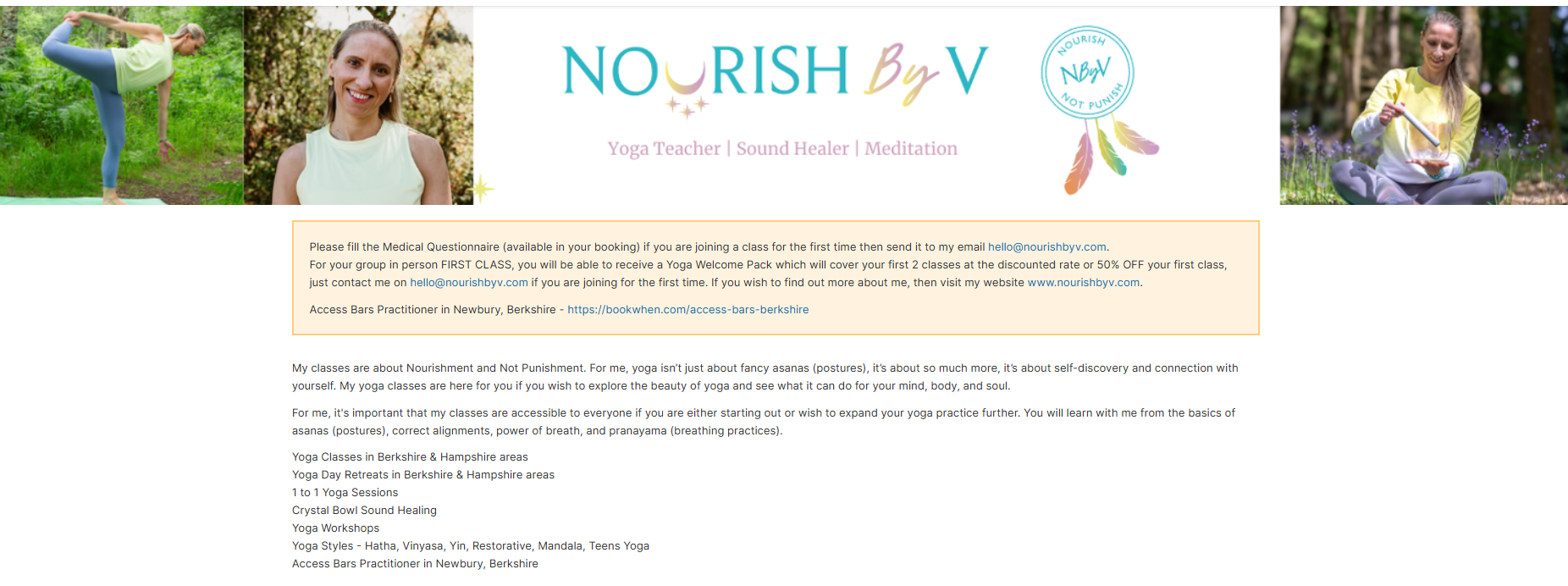
Nourish by V Bookwhen Banner
Before You Book: First-Time Students
If you're joining a class for the very first time, here are a couple of things to know:
Welcome Pack offer: For your first in-person group class, you can receive a Yoga Welcome Pack — which covers your first 2 classes at a discounted rate, just use welcomeyoga at the checkout, or 50% off your first class with a code YOGA50. Just drop me an email at hello@nourishbyv.com if you have any issues and I'll sort this for you.
Medical Questionnaire: Please fill in the Medical Questionnaire (just click on the ‘medical questionnaire’ to download the Word document file) and send it to hello@nourishbyv.com before attending your first class. Know that the medical form is quite important for me to receive to ensure, I deliver a safe yoga session for you, as well as insurance purposes. If you are not able to provide me with the medical form, know that I won’t be liable if anything happens to you in the class without understanding your medical challenges.
Step 1: Visit the Booking Page
Head to the booking system for yoga classes in Newbury and surrounding areas: 👉 bookwhen.com/nourishyogabyvand Access Bars appointments: 👉 https://bookwhen.com/access-bars-berkshire.
You'll land on the main schedule page, which shows all upcoming yoga classes, yoga retreats and workshops, as well as Access Bars appointments listed by date and time.
Step 2: Browse the Timetable
Scroll through the time schedule to find the yoga class or access bars that suits you. Classes and appointments listed include:
Yoga Flow (Hatha/Vinyasa) - in-person at Westridge or Hermitage
Slow Yoga focused on Intuitive Movement & Breath (Beginners Friendly) - in-person Beedon Village Hall
Online Yoga Flow for All Levels
Yoga Nidra & Crystal Bowl Sound Healing workshops at Westridge Studio, Highclere, Beedon Village Hall and more locations.
1-to-1 Yoga Sessions and Access Bars Appointmentsat the 'Zen of Happiness' Home Studio in Newbury, Beedon
And more!
All times are shown in London (BST) timezone.
Step 3: Select Your Class
Click on the class you'd like to attend. A details panel will open showing you as per the above image:
The date, time, and duration
The location or online link
A description of the class
The available ticket types (pay-as-you-go, class pass, etc.)
How many spaces are remaining
Then scroll down, see the T&Cs and Medical Form.
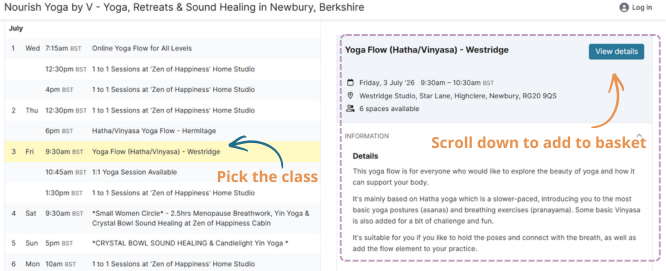
Nourish by V Booking Timetable
Step 4: Choose Your Ticket Type
You'll typically see two main options:
Option A: Pay As You Go
Perfect if you want to try a class or attend occasionally. Simply select the single class ticket, enter the number of spaces you need, and click Add to Basket.
Option B: Class Pass
If you'd like to attend regularly and save money, head to the Passes tab at the top of the page:
👉 bookwhen.com/nourishyogabyv/passes
Here you can purchase a multi-class pass. Once purchased, your pass will be available to redeem when booking any eligible class. For each class pass, you need to use them by certain amount of days once activating by booking onto a first class, refer to the passes section for more information.
💡 Tip: Passes are great value if you're committing to a regular practice!
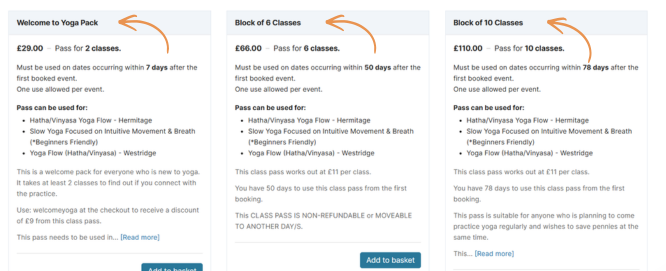
Step 5: Add to Basket
Once you've selected your ticket, click the "Add to Basket" button. You can continue browsing and add more classes to your basket if you'd like to book ahead.
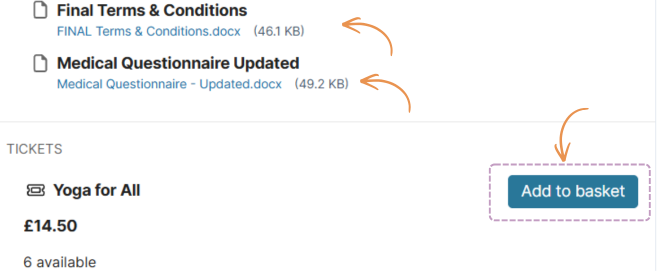
Step 6: View Your Basket & Proceed to Checkout
When you're ready, click the Basket icon (usually found at the top of the page). Review your selected classes, then click "Proceed to Checkout".
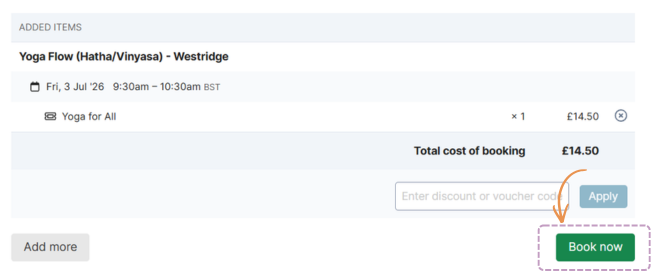
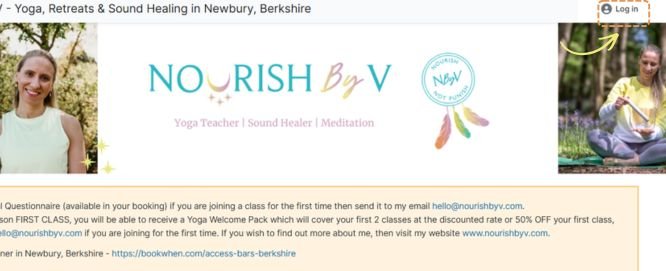
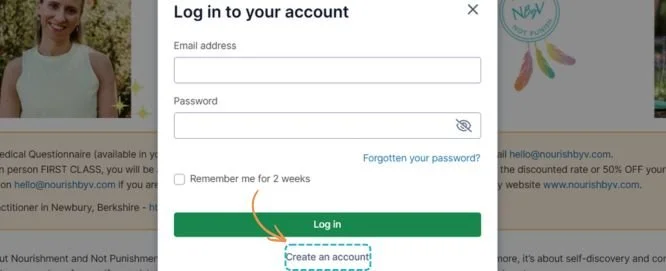
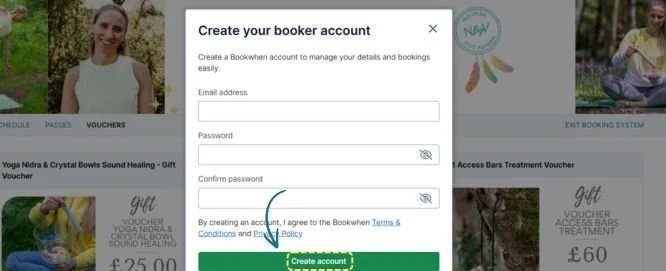
Step 7: Create an Account or Log In
If it's your first time booking, you'll be asked to create a free Bookwhen account using your name and email address. If you've booked before, simply log in with your existing details.
Having an account means you can:
View your upcoming bookings
Cancel or manage bookings if needed
Access your digital tickets and any questionnaires
Step 8: Enter Your Details & Payment
Fill in your contact details and, if paying by card, enter your payment information. Bookwhen uses secure payment processing, so your details are safe.
If you're using a class pass or voucher, you'll have the option to enter your pass/voucher code at this stage. Or if you have any issues, you can always reach me at hello@nourishbyv.com.
Step 9: Confirm Your Booking
Click "Confirm Booking" — and you're all set! 🎉
You'll receive a confirmation email with:
Your booking details
Any joining instructions (location address or online link)
A link to the Medical Questionnaire (for first-time students) if you can’t find it then contact me at hello@nourishbyv.com
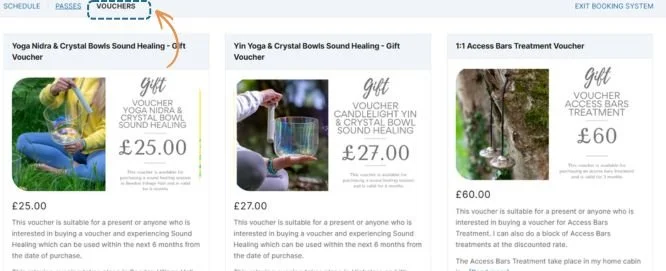
Need a Voucher?
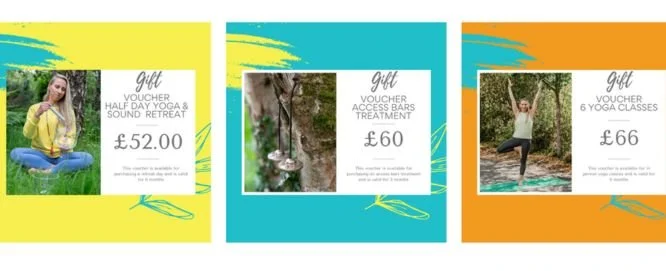
Gift vouchers are also available to purchase here: 👉 bookwhen.com/nourishyogabyv/vouchers or https://www.nourishbyv.com/shop
These make a lovely gift for a friend or loved one!
Questions or Need Help?
If you have any trouble booking, or if you'd like to chat about which class is right for you, don't hesitate to get in touch:
📧 hello@nourishbyv.com 🌐 www.nourishbyv.com 📸 Instagram: @nourishbyv 👍 Facebook: /nourishbyv
I can't wait to see you on the mat! 🧘♀️✨
You may also enjoy
![[1] How to Build a Business with Mental Health Challenges](https://images.squarespace-cdn.com/content/v1/61a89d03a8803f4321f725e3/1650644421521-27G5AB5BVC4EKO344JK1/Why+Did+I+Start+Practicing+Yoga+%2812%29.png)
![[2] How Sleep Deprivation May Affect Our Wellbeing with Dr. Christie Lewis](https://images.squarespace-cdn.com/content/v1/61a89d03a8803f4321f725e3/1650644119230-ICUAP3H43N8LB5ZV6KDB/Why+Did+I+Start+Practicing+Yoga+%2811%29.png)
![[3] Menstrual Health and How It Impacts Women’s Health](https://images.squarespace-cdn.com/content/v1/61a89d03a8803f4321f725e3/1650641943019-OG9ZOEK1USEJA5FADS06/Why+Did+I+Start+Practicing+Yoga+%289%29.png)
![[5] How Fitness Impacts Our Wellbeing](https://images.squarespace-cdn.com/content/v1/61a89d03a8803f4321f725e3/1650636914835-KUG08TTP5YZEN8DKE8N0/Why+Did+I+Start+Practicing+Yoga+%288%29.png)
![[7] Endometriosis and How It Can Impact Our Lives](https://images.squarespace-cdn.com/content/v1/61a89d03a8803f4321f725e3/1650628741687-4BV6J49W8I4J1AIHJYZX/Why+Did+I+Start+Practicing+Yoga+%286%29.png)
![[6] How to Balance All of Our Different Hats In Our Business & How to Look After Ourselves Through the Process](https://images.squarespace-cdn.com/content/v1/61a89d03a8803f4321f725e3/1650629696346-SHOGZK3R2QI0EIHJHM7P/Why+Did+I+Start+Practicing+Yoga+%287%29.png)
![[8] doTERRA Essential Oils and How They Can Support Our Wellbeing](https://images.squarespace-cdn.com/content/v1/61a89d03a8803f4321f725e3/1650302733464-LMZAIY1SSO7S49HDICV2/Why+Did+I+Start+Practicing+Yoga+%285%29.png)





Subscribe to my letter
Follow me on Instagram